I'm excited to share a new feature I've just added to MTDify - a Monthly Review section on the dashboard that gives you an at-a-glance view of how your business is performing this month.
Why I Built This
When I was designing MTDify's dashboard, I focused on quarterly and year-to-date figures because that's what matters for UK tax returns. But after using the software myself for a while, I realised something was missing: I couldn't quickly see how this month was going.
As a sole trader, I don't just care about my tax year totals. I want to know: Am I having a good month? Should I be worried? Are my expenses higher than usual?
That monthly pulse check is really valuable when you're running a small business on your own.
What's in the Monthly Review
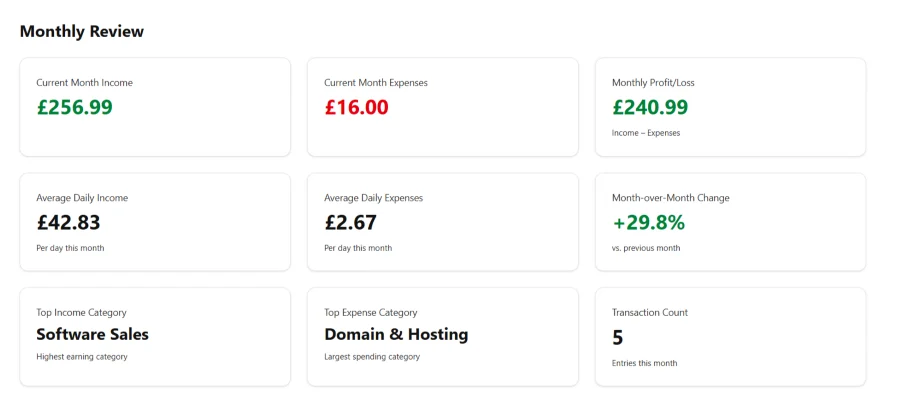
The new section sits on the dashboard, below the recent income and expenses tables. It's organised into three rows of three cards each - keeping the same clean, consistent design as the rest of the dashboard.
Row 1: The Bottom Line
Current Month Income - Total income so far this month
Current Month Expenses - Total expenses so far this month
Monthly Profit/Loss - The difference between the two
This tells you the most important thing: Are you making money this month?
Row 2: The Pace
Average Daily Income - Income divided by days elapsed
Average Daily Expenses - Expenses divided by days elapsed
Month-over-Month Change - Percentage change compared to last month
These metrics help you understand trends. If you're only 5 days into the month but already earning £100/day, you can project where you'll end up. The month-over-month comparison shows if you're growing or if things are slowing down.
Row 3: The Details
Top Income Category - Your biggest earning category this month
Top Expense Category - Where most of your spending is going
Transaction Count - How many entries you've logged
This helps you spot patterns. If "Marketing & Advertising" is your top expense category, you'll know exactly where your money is going. And the transaction count is a gentle reminder to keep up with your bookkeeping!
Real-World Example
Let me show you what it looks like with some sample data. In early February:
Current Month Income: £256.99 (3 transactions)
Current Month Expenses: £16.00 (2 transactions)
Monthly Profit: £240.99
Average Daily Income: £42.83/day
Average Daily Expenses: £2.67/day
Month-over-Month Change: +186% compared to January
This immediately tells me February is off to a strong start compared to January! The daily averages help me project that if this pace continues, I'm on track for around £1,200 income this month.
Why These Specific Metrics?
I deliberately kept this focused on nine key numbers that actually matter to sole traders:
Income, expenses, and profit - The fundamentals. You need to know if you're making money.
Daily averages - More useful than raw totals when you're mid-month. They help you project forward.
Month-over-month change - The best way to track growth without getting lost in spreadsheets.
Top categories - Helps you understand where your money comes from and where it goes.
Transaction count - A simple accountability metric. If it's the 15th and you only have 2 transactions logged, you know you're behind on bookkeeping.
I specifically didn't include VAT in the monthly review because that's a quarterly concern, not a monthly one. This keeps the focus on operating performance.
Technical Notes
For the developers out there, the implementation was straightforward:
- Updated mtdify/views.py to calculate monthly metrics using Django ORM aggregations
- Added a new template section to dashboard.html with three rows of cards
- All calculations happen server-side and update automatically based on the current date
- The month-over-month comparison was the trickiest bit - handling edge cases like January (comparing to December of the previous year) and avoiding division-by-zero errors when you're just starting out.
The code follows the same pattern as the existing quarterly calculations, so it's consistent with the rest of the application.
Try It Yourself
The Monthly Review is live in the latest version of MTDify. If you're self-hosting, just pull the latest code from GitHub and restart your server.
If you're not using MTDify yet, you can:
Self-host it - Download from github.com/djangify/mtdify
Run it locally - use Docker to self-host for free without hosting or a code editor.
About MTDify: Manage Transactions Daily (MTDify) is an open-source bookkeeping application built for sole traders like myself - people who need simple bookkeeping. It tracks income, expenses, and VAT while respecting your privacy - all your data stays on your own server. Built with Django and designed for self-hosting.
Links:
GitHub: github.com/djangify/mtdify
Thanks for sharing: